| Hardware |
| Interface |
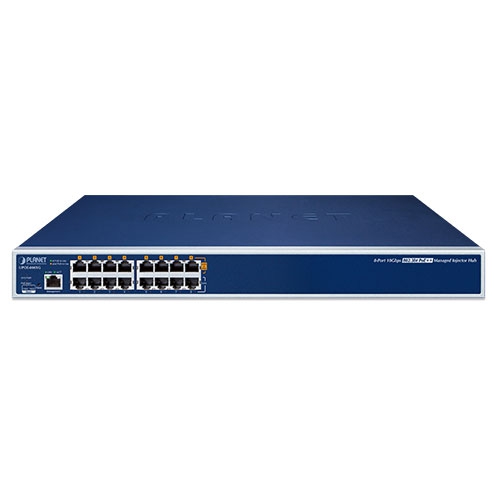
Management Port: 1 x RJ45; 10/100/1000BASE-T, auto-negotiation, auto-MDI/MDIX
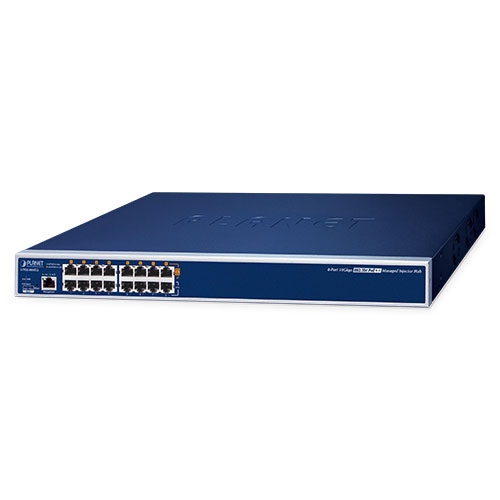
“Data” Input Ports: 8 x RJ45
“Data + Power” Output Ports: 8 x RJ45 |
| Data Rate |
10/100/1000/2.5G/5G/10GBASE-T |
| Power Requirements |
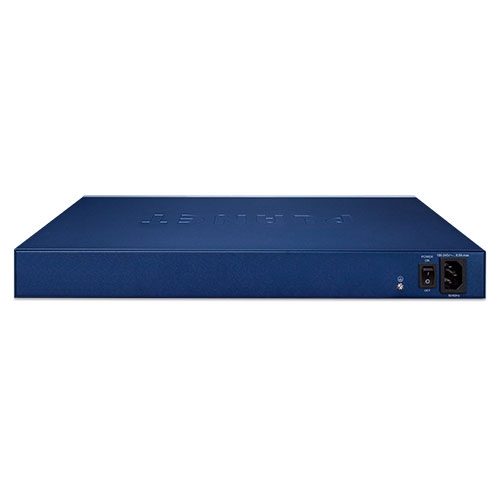
100-240V AC, 50/60 Hz, 6.5A |
| Power Consumption |
Max. 11.5 watts / 39.2 BTU (Power on without any connection)
Max. 455 watts / 1552 BTU (Full Loading) |
| Ventilation |
Smart Fan x 3 |
| Dimensions (W x D x H) |
440 x 301 x 44mm |
| Weight |
3.8kg |
| Reset Button |
< 5 sec: System reboot
> 5 sec: Factory default |
| LED |
System: SYS PWR x 1 (Green)
PoE Alarm x 1 (Red)
Fan Alarm x 2 (Red)
Management port x 1: LNK/ACT (Green),
Per PoE Port: 802.3bt PoE-in-use x 1 (Green)
802.3at/af PoE-in-use x1 (Amber) |
| Network Cable |
10BASE-T: 4-pair UTP Cat5 up to 100m (328ft)
100BASE-TX: 4-pair UTP Cat5 up to 100m (328ft)
1G/2.5GBASE-T: 4-pair UTP Cat 5e/Cat 6/Cat 6A/Cat 7 up to 100m (328ft)
5GBASE-T: 4-pair UTP Cat 6/Cat 6A/Cat 7 up to 100m (328ft)
10GBASE-T: 4-pair UTP Cat 6A/Cat 7 up to 100m (328ft)
EIA/TIA- 568 100-ohm STP (100m) |
| Power over Ethernet |
| PoE Standard |
802.3bt PoE++ PSE
Backward compatible with IEEE 802.3at PoE PSE |
| PoE Power Supply Mode |
802.3bt
End-span
Mid-span |
| PoE Power Output |
Per port 54V DC
802.3bt mode: maximum 95 watts
End-span mode: maximum 36 watts
Mid-span mode: maximum 36 watts |
| Power Pin Assignment |
802.3bt: 1/2(-), 3/6(+), 4/5(+), 7/8(-)
End-span: 1/2(-), 3/6(+)
Mid-span: 4/5(+), 7/8(-) |
| PoE PD Type |
Standard
Legacy
Force |
| PoE Power Budget |
400 watts |
| Number of 95W 802.3bt Type-4 PDs |
4 |
| Number of 60W 802.3bt Type-3 PDs |
6 |
| Number of 802.3at PDs |
8 |
| PoE Management |
Power limit by consumption and classification
PoE function enable/disable
Per port PoE function enable/disable
Per port PoE power schedule
Power feeding priority
PD alive check
PD classification detection
Current per port usage and status
Total power consumption |
| Security |
| Firewall |
SPI Firewall Protection |
| Authentication |
Authentication Method Configuration |
| Filtering |
MAC Filtering |
| Access Management |
HTTP/HTTPS/SNMP |
| Certificates |
System CA Certificate for HTTPS |
| Management Functions |
| Management Interface |
HTTP/HTTPs Web user interface |
| Secure Management Interface |
TLSv1.2, TLSv1.3 |
| Management Feature |
IPv4 and IPv6 dual stack management
Web interface for remote management
LLDP Link Layer Discovery Protocol (LLDP)
PLANET DDNS and Easy DDNS
Supports Network Time Protocol (NTP)
System Maintenance
Firmware upload via HTTP
Configuration upload/download via HTTP
Reboot button for system reboot
Reset button for system reset to factory default
PLANET Smart Discovery utility automatically finds PLANET devices on the network
PLANET NMS system and CloudNMS for deployment management
Remote RADIUS Server authentication
Scheduled System Power Rebooting
Network Diagnostic
ICMPv6/ICMPv4 Remote Ping
Trace Route |
| SNMP Management |
SNMP v1, v2c and v3 for system status monitoring
SNMP trap for alarm notification of events |
| Event Management |
Local system event log
Remote syslog |
| Standards Conformance |
| Regulatory Compliance |
FCC Part 15 Class A, CE |
| Standards Compliance |
IEEE 802.3 10BASE-T Ethernet
IEEE 802.3u 100BASE-TX Fast Ethernet
IEEE 802.3ab 1000BASE-T Gigabit Ethernet
IEEE 802.3bz Gigabit 2.5G, 5GBASE-T Ethernet
IEEE 802.3an Gigabit 10GBASE-T Ethernet
IEEE 802.3af Power over Ethernet
IEEE 802.3at Power over Ethernet Plus
IEEE 802.3bt Power over Ethernet Plus Plus
RFC 768: UDP
RFC 791: IP
RFC 2068 HTTP
RFC 1157: SNMP v1
RFC 1902: SNMP v2c
RFC 2273: SNMPv3
RFC 5424: Syslog |
| Environments |
| Operating |
Temperature: 0 ~ 50 degrees C
Relative Humidity: 5 ~ 90% (non-condensing) |
| Storage |
Temperature: -10 ~ 70 degrees C
Relative Humidity: 5 ~ 90% (non-condensing) |










 网站地图
网站地图 联系我们
联系我们 RSS
RSS